RE013398

[L40s Pro Ultra] LDS for L40S pro ultra

My L40s Pro Ultra shows a laserdistancesensor (LDS) error.
I need partnumber for LDS Dreame L40s pro ultra to replace it.
It is compartible with LDS for Xiaomi Mijia M40 D110CN, or may be with Dreame L10S Pro Ultra Heat? Dreame X30? X40?
You need to log in to reply. Login | Register

6 Comment

Hello,

We sincerely apologize for the inconvenience. We recommend trying the following steps first to see if the issue can be resolved:

1. Please check whether your robot is running the latest firmware version. If not, update it to the latest version and verify whether the robot operates normally afterward.

2. If the firmware is already up to date, please follow the troubleshooting steps below:

1) Gently shake or tap the LDS cover and check whether it springs back normally.

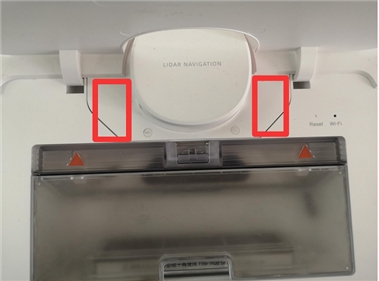
2) Please inspect the area around the laser distance sensor for any debris or foreign objects. If any are found, clean the area and try again. Please refer to Figure 1.

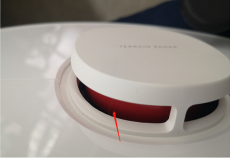
3) Please check whether the LDS can rotate normally. As shown in Figure 2, gently rotate the area indicated by the arrow (the exact location may vary slightly depending on the model; the image is for reference only) and verify that it rotates freely.

Due to possible differences in hardware specifications, firmware configurations, and sensor parameters between different models, we do not recommend purchasing or replacing the LDS module from other models on your own. In addition, self-disassembly or unauthorized repair attempts may cause other functional issues and could affect your device's warranty coverage.

To better assist you, if the problem persists after completing the above troubleshooting steps, we recommend contacting our after-sales support team and providing your device SN (serial number) and proof of purchase. We will then be able to offer further assistance based on your specific situation.

After-Sales Support

Phone: 0808 502 1616
Email: aftersales@dreame.tech
Service Hours: Monday to Sunday, 9:00 AM to 6:00 PM

Thank you for your understanding and support.
LDS异常1.png
RE013398 Thread Starter
Hello,
I’m trying all steps:
1. robot have the latest firmware version 4.3.9_3684.
2.1 LDS cover springs back normal
2.2 The area around the laser distance sensor have no any debris or foreign objects
2.3 The LDS can rotate normally, as a manually, and on work robot.
I'm send mail to After-Sales Support, and wait answer.
14-8-2026 08:53:49 GB Translate

Hello,

We are sorry to hear that the issue still persists after completing the troubleshooting steps above.

Since you have already contacted the after-sales support team, we recommend that you continue communicating with them as the priority.

If you do not receive a response for an extended period of time, or if you encounter any difficulties during the after-sales process, please feel free to contact us again. At that time, please provide your service ticket number (usually a series of digits beginning with 83), and we will help you check the status of your case and do our best to provide further assistance.

Thank you for your patience and cooperation.
17-8-2026 10:31:25 GB Translate

RE013398 Thread Starter
Hello!
Support was fast, polite, but unhelpful.
Global support sent me to local support, and local support sent me to service. I didn't make it to service because I received a package from Grandpa Liao.
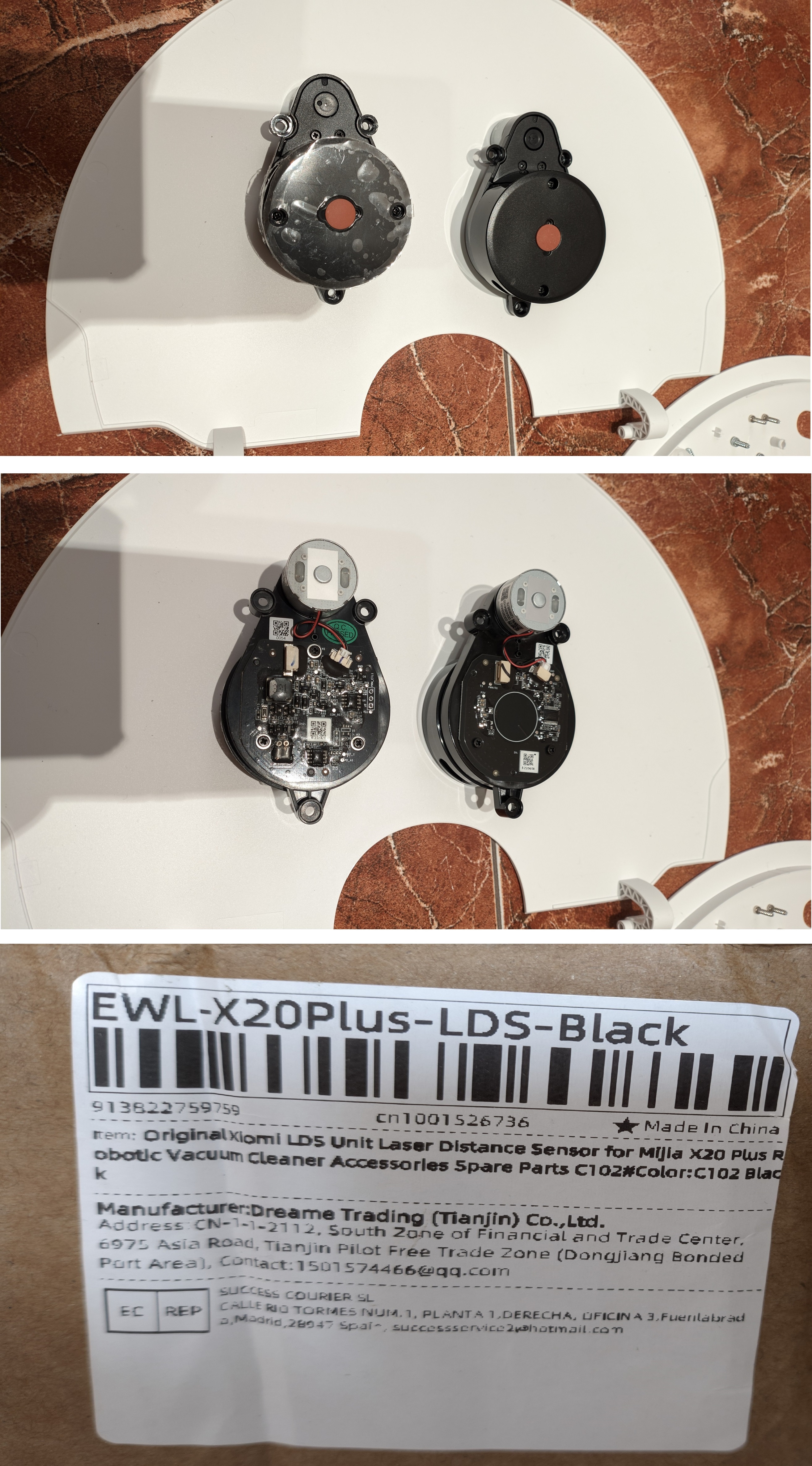
Replacing the sensor is entirely at your own risk. I don't recommend it to anyone, but the sensor Xiaomi Mijia X20 Plus is completely identical and works in my L40S pro ultra. The replacement process is simple and can be found on YouTube and Reddit.
Lol, I was forbidden from attaching pictures here today, maybe I'll add more tomorrow
29-8-2026 10:12:25 GB Translate

RE013398 Thread Starter
On the left is a sensor for Xiaomi Mijia X20 Plus, on the right is for Dreame L40S pro ultra.
LDS l40s pro ultra.jpg
31-8-2026 08:30:34 GB Translate

UID:RE013398 GB
  • 4Posts
  • 0Friends

© 2026 Dreame Forum All Rights Reserved | Support by Discuz! X5.0 Font by MiSans

Quick Reply Back to Top Return to List