BN763746

[L40s Pro Ultra] Vacuum carpets along its path, not first or last? L40s Pro Ultra

Hey!

Is it possible to make my L40s Pro Ultra vacuum carpets along its path during cleaning instead of avoiding the carpets until last (or first)?

I can't set the carpets to "ignore" because then the robot vacuum won't raise the mops during mopping sessions.

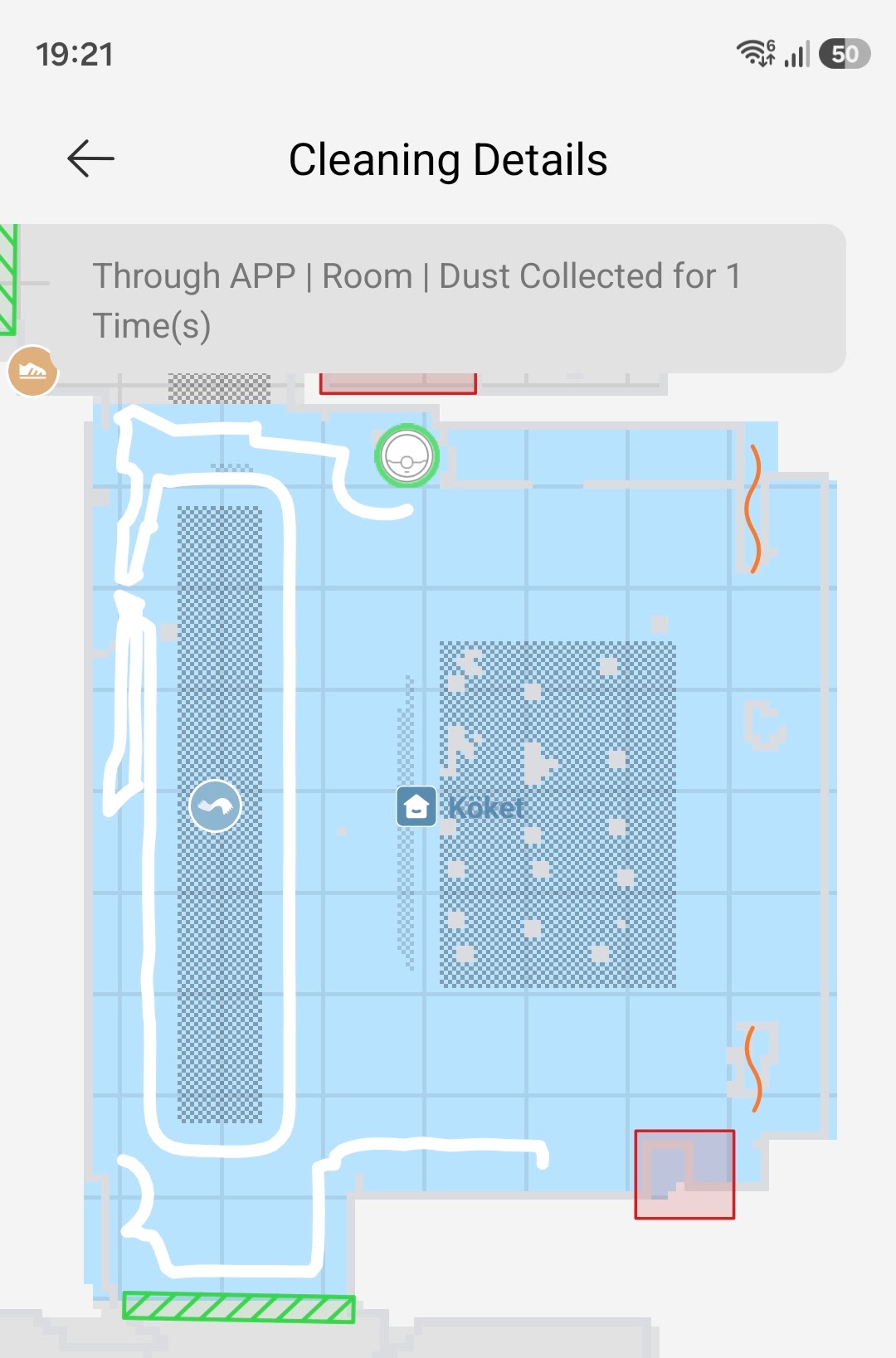
Also, because the robot is actively avoiding carpets. it misses parts of the rooms and it takes almost twice as long to clean compared to my previous robot vacuum from another large brand.

I have attached a screenshot of how it behaves in my kitchen. It starts by going around the edges of the room, but since there's a carpet somewhat close to the edge, the robot gets super scared and avoids it. You can see in the image that it goes around the carpet, tries to vacuum a bit near the room's edge but stops, gives up and just moves on to another part of the kitchen.
How do I fix this? What settings to I change so the robot vacuums the carpet along its path instead? Current behaviour is ridiculous.

Thanks!
You need to log in to reply. Login | Register

7 Comment

I'd check the carpet settings in the app — if it's set to avoid, turning that off should let it go over them as it passes rather than saving them till last.
29-9-2026 19:05:40 GB Translate

Unfortunately, none of the available options fixes this. The options are:

- Vacuum (selected)
- Avoid
- Ignore
- Crossing carpets

Avoid will avoid the carpet fully.
Ignore will vacuum it in its path but it will also mop the carpet.
Crossing carpets will allow it to cross the carpet but without vacuuming.

Only option left is Vacuum but there's nothing in its settings that help. I can choose to lift mops or leave them in the dock. I can also select to vacuum the carpet first (instead of last).

I cannot find any other option that has something to do with how it handles carpets.
29-9-2026 21:10 GB Translate
Hello,

Based on the current cleaning logic, the robot plans its cleaning route automatically and cleans carpets and hard floors separately. Therefore, the behavior you described can occur during the cleaning process.

We understand your preference for having the robot vacuum carpets as part of its normal cleaning route to improve overall cleaning efficiency. We appreciate you taking the time to share your experience and suggestions. Your feedback has been recorded and will be forwarded to the relevant team for consideration in future product improvements.

Thank you again for your valuable feedback.
30-9-2026 08:34:52 GB Translate

Hello, the Aqua10 Ultra also automatically plans its cleaning route during operation and cleans carpets and hard floors separately. We have recorded your feedback and shared it with our technical team for consideration.
5-10-2026 10:15 GB Translate
Do all Dreame robot vacuums behave the same way? Is this also the case for Dreame Aqua10 Ultra?
4-10-2026 08:09 GB Translate
Hello, we are sorry that this feature does not currently meet your needs. We have recorded your feedback and will share it with the product team for future evaluation and optimization. We wish you all the best.
1-10-2026 06:05 GB Translate
Oh, I see. That is very unfortunate and a strange decision to not have such a basic feature. I will be selling this vacuum and order a robot vacuum from another brand.

Thank you for confirming this issue.
30-9-2026 10:59 GB Translate
UID:BN763746 GB
  • 4Posts
  • 0Friends

© 2026 Dreame Forum All Rights Reserved | Support by Discuz! X5.0 Font by MiSans

Quick Reply Back to Top Return to List