Angy😘

[X50 Ultra Complete] SERIOUS CARPETS ISSUE

SINCE ITS WINTER I PUT ALL MY CARPETS IN MY HOUSE AND THATS WHERE THE ISSUE BEGAN!MY CARPETS COVER ALL THE SPACE IN MY HOUSE AND LEAVE ONLY SONE SMALL ATEAS WOTH ONLY TILES.THE FIRST PROBLEM IS THAT MY ROBOT CANNOT IDENTIFY AND SAVE CARPETS.I TRIED A MILLION THINGS AS TOTAL RESET,CLEANING THE SENSORS,MANUALLY ADD MY CARPETS,DELETING MAP…I CANT EVEN REMEMBER HOW MANY DIFFERENT THINGS I TRIED BUT IN ALL TIMES,EITHER DID NOT MOP OR VACUUM THE SMALL AREAS WITH ONLY TILES,OR COULD NOT SAVE CARPETS OR CLEANING THE SAME SPOT IN SOME CARPETS OVER AND OVER AGAIN. I AM LITERALLY FURIOUS BECAUSE WE HAVE PAID SO MUCH MONEY AND IT ONLY DOES A GREAT JOB IN FLOORS WITH TILES.ONCE YOU PUT CARPETS THE DISASTER BEGINS!
You need to log in to reply. Login | Register

3 Comment

Sounds really frustrating, especially after trying that much yourself. That's one for support now — email aftersales@dreame.tech with your SN and let them take a proper look.
17-10-2026 20:11:49 GB Translate

Angy😘 Thread Starter
Thank you🙏
18-10-2026 17:33:14 GR Translate

Hello,

We are sorry for the inconvenience caused.

We recommend first cleaning the carpet sensor located on the underside of the robot, then checking the carpet cleaning settings in the app. If the carpet is currently set to "Avoid", please change the setting to "Vacuum" and test again.

If the issue persists, we also recommend creating a new map, as major changes to the floor layout and carpet coverage may affect the robot's navigation and carpet recognition.

To create a new map:
• Open the Dreamehome app.
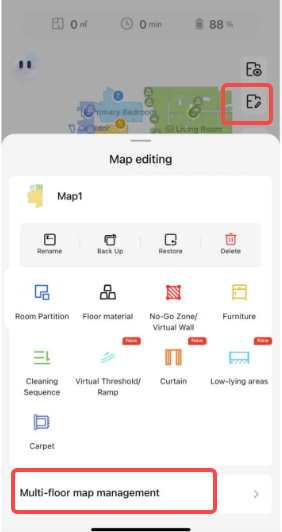
• Tap the map editing icon.
• Enable the Multi-floor Maps option.
• Tap the "+ Create Map" button at the bottom of the screen and follow the instructions to create a new map.

We hope this information is helpful.
screenshot-20251010-095251.png
19-10-2026 09:11:39 GB Translate

UID:AF553261 GR
  • 2Posts
  • 0Friends

© 2026 Dreame Forum All Rights Reserved | Support by Discuz! X5.0 Font by MiSans

Quick Reply Back to Top Return to List