💡We are curious! How many Dreame products do you have at home?
|
|
|
|
|
|
|
|
|
|
|
|
|
|
For the Dreamehome App: Tap the three dots in the upper-right corner. Select Device Sharing. Enter your friend's or family member's account ID. Tap Share. For the Xiaomi Home App: Go to the device page. Tap the three dots in the upper-right corner. Enter the Settings page and select Device Sharing. Tap Mi Account. Enter your friend's or family member's account ID. Tap Confirm.
10-9-2026 10:28
 GB
Translate GB
TranslateHello, please refer to the instructions below. If you would like to share your device with another user, please follow the steps below (as shown in the attached screenshot). Before sharing the device, please ensure that: Your robot is connected to a Wi-Fi network. The user you wish to share the device with has already registered an account in the app. 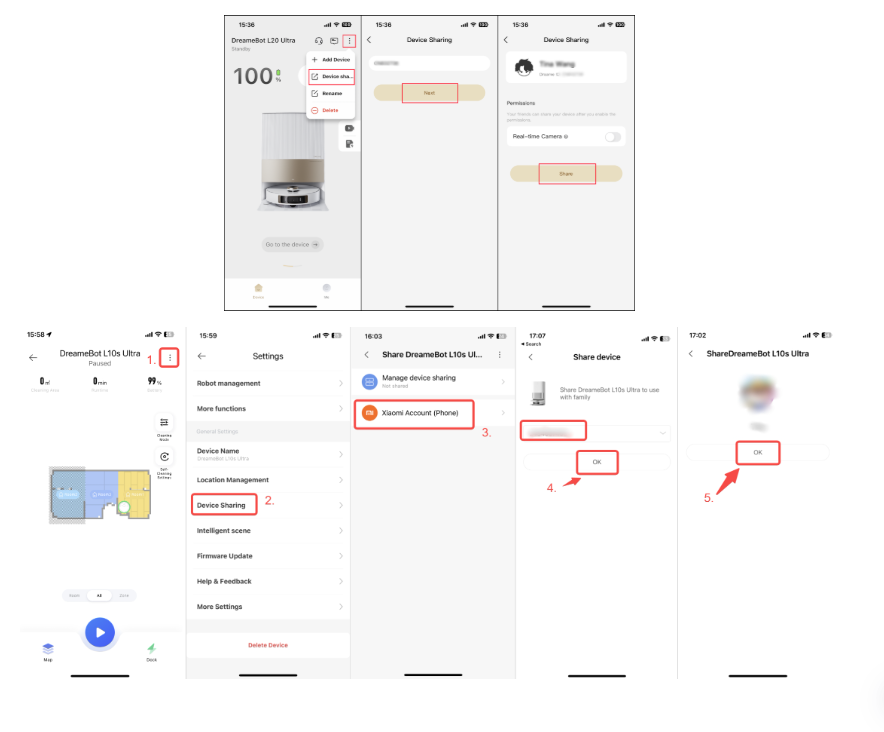
10-9-2026 10:27
GB
Translate |
|
|
|
© 2026 Dreame Forum All Rights Reserved | Support by Discuz! X5.0 Font by MiSans








Additionally, we recommend verifying that both devices are set to the same country/region in the Dreame app. If different regions are selected, sharing invitations may not be received properly.
An unstable network connection may also prevent sharing requests from being received. Please ensure that both phones are connected to a stable internet connection (Wi‑Fi or mobile data), and then try sending the sharing invitation again.